Whatever: A Handwritten Font for Web Design
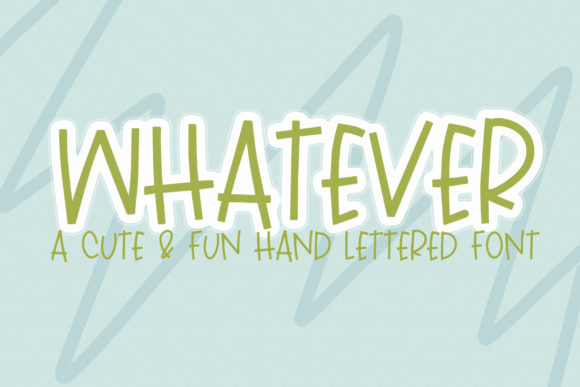
Working on a boutique online store’s homepage, I needed a font that felt personal and approachable. After testing several options, I settled on Whatever—a cute and fun handwritten font that brought a fresh energy to the design. Its quirky, readable, and childish style made it perfect for a brand that wanted to feel friendly and authentic.
Whatever has a distinct personality. It feels like it was written with a pen, giving it a warm, human touch. The strokes are slightly irregular, which adds character without sacrificing legibility. This makes it ideal for digital projects where a more polished or rigid typeface might feel too formal or distant.
When I first tried Whatever in the hero section of the website, I was struck by how it stood out. The headline, "Shop with Joy," looked inviting and playful, setting the tone for the entire site. It wasn’t just about aesthetics—it created a sense of connection with the audience, making the brand feel more relatable.
Using Whatever in Digital Layouts
Whatever works best as a display font, especially in areas where visual impact is key. Headers, call-to-action buttons, and short phrases benefit from its expressive style. On a product landing page, using it for the main title gave the page a unique identity, while still maintaining clarity and ease of reading.
For a coaching website, I used Whatever in the headline of the services section. The font added a sense of warmth and creativity, complementing the brand’s mission of helping people grow. It also paired well with a clean sans serif font for body text, creating a balanced contrast that kept the layout from feeling too busy.
One thing to consider is how Whatever performs in different contexts. On mobile screens, it’s important to ensure the font remains readable at smaller sizes. I tested it on buttons and found that keeping the text short and using a slightly larger size helped maintain legibility without sacrificing style.
Readability and User Experience
While Whatever is highly readable in most cases, it’s not the best choice for long blocks of text. Using it for body copy would likely overwhelm users and make the content harder to scan. Instead, I reserved it for headings, logos, and decorative accents, where its charm could shine without affecting usability.
On dark backgrounds or image overlays, I noticed that the font retained good contrast, but I adjusted the line height and spacing to improve readability. For a blog redesign, I used it in the header and subheadings, pairing it with a simple serif font for the article text. This combination created a cohesive and professional look while keeping the design engaging.
Another consideration is how the font behaves in responsive layouts. I made sure to test it across different screen sizes and found that it scaled well without losing its character. For a campaign landing page, this ensured that the message remained clear and consistent, no matter how users accessed the site.
Pairing and Branding
Font pairing is an essential part of web design, and Whatever offers a lot of flexibility. When working on a digital brand kit, I paired it with a modern sans serif font for body text, allowing the handwritten style to stand out without clashing. This combination worked well for social media graphics, email newsletters, and promotional banners.
For a course sales page, I used Whatever in the headline and CTA button, while the rest of the content was set in a clean, easy-to-read font. This helped draw attention to key messages without overwhelming the user. The result was a design that felt both professional and personable.
When choosing a font like Whatever, it’s important to check the available styles, weights, and multilingual support. These details can affect how the font looks across different languages and platforms. I also made sure to verify the licensing terms before using it on client projects and online stores, ensuring that it met all legal requirements.
Real-World Applications
Whether you're designing a creative portfolio, a small business website, or a product landing page, Whatever can add a unique touch to your design. Its approachable style makes it ideal for brands that want to communicate warmth and authenticity.
In a recent project, I used it for a logo and header on a boutique online store. The font gave the brand a fresh, modern feel that aligned with its mission of offering handmade, personalized products. It also worked well in digital ads, where its visual appeal helped catch the eye of potential customers.
Overall, Whatever is a versatile and charming font that can elevate a variety of digital projects. Its playful yet readable nature makes it a great choice for web designers looking to add a personal touch to their layouts. Whether you’re building a new website or refining an existing one, this font offers a refreshing alternative to more traditional typefaces.